How to Use a Google Maps Scraper MCP Server ?
Updated 7/21/2026
You can ask an agent to find businesses in a city, check their public reviews, or retrieve listing photos—saving you from manually copying each record into a spreadsheet.
For example:
Find dental clinics in Austin with fewer than 100 reviews. Include their phone numbers, websites, ratings, and Google Maps URLs.
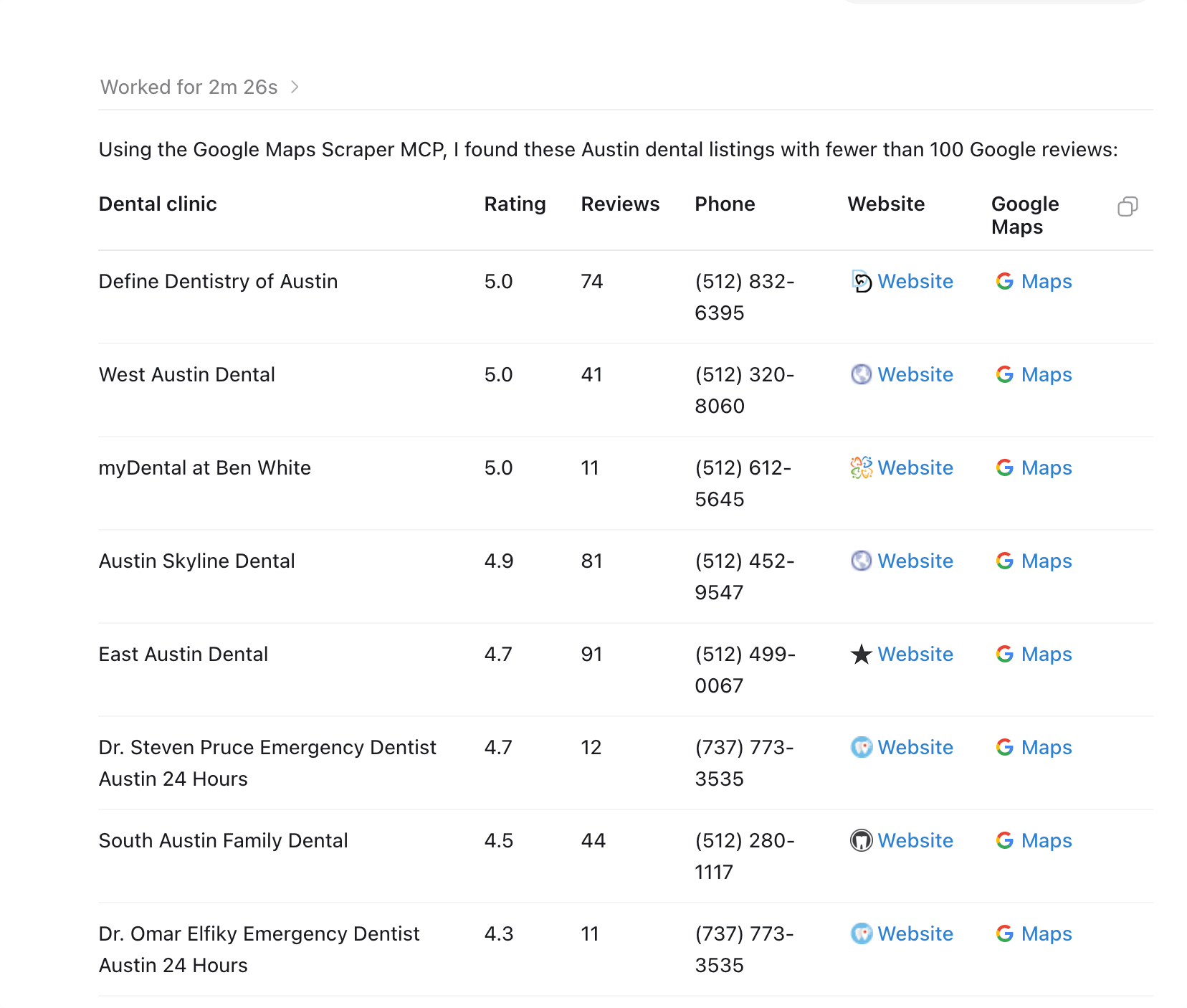
This guide uses the remote Google Maps Scraper MCP server provided by G Maps Extractor. The main setup examples use Claude Code and Cursor, followed by shorter configurations for VS Code and Codex. For direct application integrations and JSON workflows, use the Google Maps Scraper API. Want an easier, no-code solution? Try the online Google Maps Scraper here.
Before You Configure the Server
You need a G Maps Extractor account and an API key.
https://cloud.gmapsextractor.com/api/mcpAuthorization: Bearer YOUR_API_KEYBe careful where you save it. Cursor and VS Code configurations often live inside a project folder, which means they can accidentally be committed to Git. Check your repository status before pushing the configuration anywhere public.
The server provides tools for business searches, public reviews, and Google Maps photo data.
A business search may return fields such as the listing name, address, phone number, website, category, rating, review count, coordinates, opening hours, and Google Maps URL. The exact fields depend on what is publicly available for each listing.
Missing values are normal. A business may not publish a website or phone number, and the agent should leave those fields empty rather than trying to infer them.
Connecting Claude Code
Claude Code is a convenient place to test the MCP server because the connection can be created directly from the terminal.Run:
claude mcp add --transport http google-maps-scraper-mcp \
  https://cloud.gmapsextractor.com/api/mcp \
--header "Authorization: Bearer YOUR_API_KEY"Before asking for business data, confirm that Claude can see the tools:
Show the tools available from google-maps-scraper-mcp. Do not call them yet.
A simple first request is enough to confirm that the complete path is working:
Use google-maps-scraper-mcp to find three coffee shops in Portland, Oregon. Return the business name, rating, review count, phone number, website, and address.
A screenshot showing the tool call and returned records would be useful in the published article here.
Connecting Cursor
Cursor reads project-level MCP settings from:.cursor/mcp.jsonCreate the file and add:
{
  "mcpServers": {
    "google-maps-scraper-mcp": {
      "url": "https://cloud.gmapsextractor.com/api/mcp",
      "headers": {
        "Authorization": "Bearer YOUR_API_KEY"
      }
    }
  }
}your-project/
├── .cursor/
│ └── mcp.json
├── src/
└── package.jsonIf the server does not appear, inspect the JSON before changing anything else. A trailing comma is enough to prevent the configuration from loading:
{
  "headers": {
    "Authorization": "Bearer YOUR_API_KEY",
  }
}It is also easy to create .cursor/mcp.json in one folder while Cursor has another folder open. In that situation, the file can be perfectly valid and still have no effect.
Once the server appears in Cursor’s MCP or tools panel, try a request that forces the agent to use current listing data:
Use google-maps-scraper-mcp to find 10 plumbers in Dallas, Texas. Keep businesses that have a website and return valid JSON with name, phone, website, rating, review_count, address, and maps_url. Use null when a field is unavailable. Do not create missing values.
A screenshot of Cursor showing the connected server would fit well after this section.
Using It for an Actual Prospecting Task
Consider a local marketing agency looking for dental clinics that may need help improving their Google Maps presence.Begin with a normal business search:
Use the Google Maps Scraper MCP server to find 30 dental clinics in Austin, Texas. Return the business name, address, phone number, website, rating, review count, and Google Maps URL. Do not evaluate the businesses yet.
A search for dentists may include orthodontists, cosmetic clinics, chains, and practices just outside the city boundary. That is not necessarily wrong. It simply means you should decide which results belong in the project before using another API request to analyze them.
You can then ask the agent to reduce the list:
Review the businesses already returned. Keep listings with fewer than 50 reviews, a rating below 4.5, or no website. Add a short note showing why each listing was kept.
Recent reviews can provide a more concrete reason to investigate:
For the first five businesses in the filtered results, retrieve their most recent public reviews. Report complaints that appear in more than one review. Include the dates and a short supporting excerpt. Do not claim a problem unless it appears in the retrieved reviews.
If several customers mention unanswered calls or long appointment delays, the outreach angle is based on visible evidence. If no pattern appears, the report should say that rather than manufacture one.
Prompt Specificity Matters More Than Prompt Length
A request such as:Find dentists in Texas.
A more useful version would be:
Find 25 dental clinics in Austin, Texas. Return business name, phone number, website, rating, review count, address, and Google Maps URL. Exclude listings outside Austin. Format the results as CSV-ready rows. Leave unavailable fields empty.
Avoid adding every possible filter to the first request. A search requiring a high rating, low review count, public phone number, website, email address, recent photos, and specific opening hours may return almost nothing.
It is usually easier to inspect a reasonable first batch and then filter the records already returned.
Getting Useful Review Analysis
Review prompts often produce bland summaries because the request itself is bland.“Analyze these reviews” gives the agent freedom to write something that sounds reasonable without showing how it reached the conclusion.
Ask for evidence that can be checked:
Retrieve the newest 30 reviews for this business. Find issues that appear in at least two separate reviews. For each repeated issue, show how many reviews mention it, the relevant dates, and one short excerpt. If no issue appears more than once, state that clearly.
The same principle applies when comparing competitors. An unexplained reputation score may look useful in a table, but it is difficult to audit. Repeated themes, review dates, rating changes, and response patterns are easier to verify.
Working With Google Maps Photos
Retrieving photo URLs and visually analyzing photos are not always the same operation.A request such as:
Retrieve the available Google Maps photos for these businesses. For each listing, return the photo URLs and indicate whether exterior, interior, product, or service photos are available. Do not make claims about image quality unless the images were actually inspected.
Some MCP clients may receive photo metadata without loading every image into the model’s visual context. In that case, the agent can report that photos exist but should not confidently judge whether they are attractive, recent, or professionally taken.
For a local SEO audit, even simple counts can still be useful. A listing with only two public photos may deserve attention when nearby competitors have dozens.
VS Code Setup
Create:.vscode/mcp.jsonThen add:
{
  "servers": {
    "google-maps-scraper-mcp": {
      "type": "http",
      "url": "https://cloud.gmapsextractor.com/api/mcp",
      "headers": {
        "Authorization": "Bearer YOUR_API_KEY"
      }
    }
  }
}Where the tools appear depends on the extension or AI agent you use. A valid configuration alone is not enough if that extension only supports local command-based MCP servers and not remote HTTP connections.
Codex Setup
Open:~/.codex/config.tomlAdd:
[mcp_servers.google-maps-scraper-mcp]
type = "http"
url = "https://cloud.gmapsextractor.com/api/mcp"

[mcp_servers.google-maps-scraper-mcp.headers]
Authorization = "Bearer YOUR_API_KEY"Do not paste the Cursor JSON block into this file. Codex uses TOML, so the section names, quotation rules, and assignment syntax are different.
Diagnosing a 401 Response
A 401 Unauthorized response means the server was reached, but it did not accept the credentials.The expected header is:
Authorization: Bearer YOUR_API_KEYAuthorization: YOUR_API_KEYAuthorization: BearerYOUR_API_KEYAuthentication: Bearer YOUR_API_KEYAlso check whether the API key was copied with surrounding quotation marks or spaces. A configuration may look correct while still sending an extra character at the beginning or end of the token.
When the Server Loads but the Agent Ignores It
An AI agent does not have to call every available tool.If you ask for “good restaurants in New York,” it may answer from general knowledge because the prompt does not clearly require live listing data.
Name the server and request fields that normally require a current lookup:
Use google-maps-scraper-mcp for this request. Do not answer from general knowledge. Find restaurants in Brooklyn and include their current review counts, phone numbers, websites, and Google Maps URLs.
Irrelevant or Incomplete Search Results
Broad searches are more likely to contain noise.“Marketing agencies in California” may return general web-design studios, advertising firms, consultants, and agencies hundreds of miles apart.
A query such as “local SEO agencies in San Diego” gives the search a clearer boundary. You can also state what does not belong:
Exclude agencies that do not mention local SEO or Google Business Profile services.
For better coverage, divide the search by neighborhood or ZIP code, combine the results afterward, and remove duplicates using a stable place identifier where available.
Missing Fields Are Part of the Data
An empty website or phone field does not automatically mean the scraper failed.Some listings simply do not publish that information. The same applies to opening hours, reviews, and photos.
Preserve missing values as null or blank cells. Guessing a domain from the company name can contaminate the dataset with a website belonging to a different business.
This matters even more in automated workflows. One invented value can later be treated as verified data by a CRM import, enrichment process, or outreach tool.
Google Maps Scraper MCP and Google’s Maps MCP Are Different Tools
Google’s Maps Code Assist MCP is designed to help coding agents access current Google Maps Platform documentation, policies, tutorials, and code examples.It is useful when you are building an application with Google Maps Platform APIs.
A Google Maps Scraper MCP server serves a different purpose. It provides business listing data for tasks such as prospect research, listing comparisons, review analysis, and photo collection.
The similar names can be confusing, but the intended workflows are not the same.
Start Small Before Running a Large Job
A five-record request reveals more than a long setup checklist.It shows whether the category was interpreted correctly, whether the location boundary makes sense, which fields tend to be missing, and whether the output is suitable for the next part of your workflow.
Once that small request works, increase the result count or divide the search into geographic batches.
For recurring jobs involving hundreds or thousands of records, the underlying scraper API or cloud extraction interface will usually be easier to monitor than a long chat session. MCP is most useful when an agent needs to decide what to search, inspect the returned data, and use the result as part of a wider task.